How to open a magnet link on Android
Short answer: Android can't open magnet links by itself; you need a torrent app. Install one, then tap the magnet link and choose the app, or copy the link and paste it into the app. The download starts in seconds.
What a magnet link is
A magnet link starts with magnet:?xt=urn:btih: followed by a long code. It isn't a file: it's the torrent's ID. A torrent app uses it to find the people sharing that torrent and download it from them.
1. Install a torrent app
If you tap a magnet link and nothing happens, or you see "No app can open this link", your phone has no torrent app yet. Install one from Google Play, such as Magnet, Flud or LibreTorrent.
2. Tap the link and pick the app
- Tap the magnet link in your browser.
- Android asks which app to open it with. Pick your torrent app. Tap Always if you want it every time.
- The app shows the torrent's name and files. Choose the files and the folder, then tap Download.
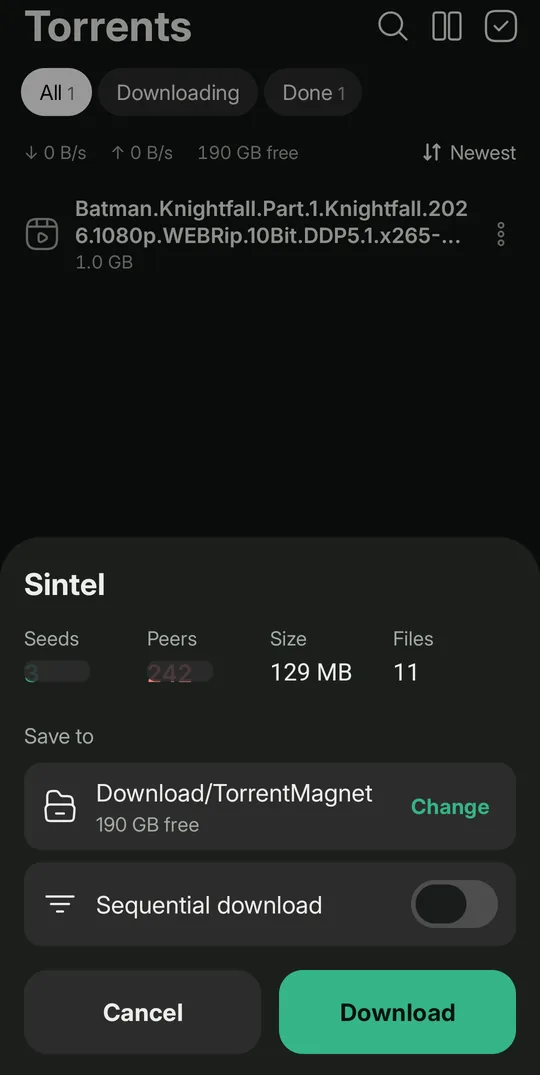
Magnet asks where to save, then downloads. Shown: Sintel, an open film by the Blender Foundation (CC BY).
3. Or copy and paste it
Some apps open links in their own small browser, which doesn't hand magnet links to other apps (chat and social apps often do this). Then copy the link instead:
- Press and hold the magnet link, then tap Copy link.
- Open your torrent app and tap Add (or the + button).
- Tap Paste, then Add. Magnet fills the link in by itself when one is already copied.
You can also use Share on a message that holds a magnet link and pick the torrent app.
If it doesn't work
- "No app can open this link": no torrent app is installed (step 1).
- The app says the link isn't valid: part of the link was lost while copying. Copy the whole link again; it must start with magnet:?
- It stays on "Downloading metadata" or 0%: nobody is sharing that torrent right now. See Torrent stuck at 0%.
Questions
Is a magnet link safe?
The link itself is just an ID. What matters is what you download: only get files you trust and are allowed to have.
What's the difference between a magnet link and a .torrent file?
Both lead to the same download. A .torrent file holds the list of files; a magnet link asks the people sharing it for that list first, which takes a few seconds more. See How to open a .torrent file.
Can I open a magnet link without an app?
Not on Android. A browser can't download torrents; you need a torrent app.
Do I need an account?
No. Torrent apps like Magnet work without signing up.
About Magnet: Magnet is a torrent app made by us. It opens magnet links from any browser, fills in a copied link for you, and lets you watch a video while it downloads. Flud and LibreTorrent open magnet links too; the steps above work for all of them.
Get it on Google Play