Magnet
The best torrent apps for Android in 2026, compared honestly
Short answer: for most people, Flud is the safe all-rounder, LibreTorrent is the pick if you want open source, and TorrDroid if you mostly want to search from inside the app. If watching videos while they download matters most, try Magnet. That last one is ours, so read our reasons below and judge for yourself.
Who wrote this: the team that makes Magnet. We've tried to be fair: every fact below comes from the apps' own Google Play pages and from using them, checked in November 2026. Where another app is the better choice, we say so.
At a glance
| App | Installs | Watch before it's done | Upgrade to buy | Open source |
|---|---|---|---|---|
| µTorrent | 260M+ | Built-in player | Pro | No |
| BitTorrent | 55M+ | Built-in player | Pro | No |
| Flud | 30M+ | Sequential download, then your player | In-app purchase | No |
| TorrDroid | 30M+ | Sequential download | In-app purchase | No |
| tTorrent | 15M+ | Sequential download | Pro | No |
| LibreTorrent | 1.5M+ | Streams with sequential download | Optional donation | Yes |
| Magnet (ours) | New in 2026 | Built-in player that fetches ahead | No, free | No |
Installs as shown on Google Play, November 2026.
µTorrent and BitTorrent
The two oldest names, from the same company. Both have built-in music and video players, file picking and no speed limits; a Pro version adds extras.
- Good at: the most familiar names; players for music and video; huge user base.
- Keep in mind: the two apps are nearly the same, so pick one. The free versions make money from ads and offers; Pro removes them.
Flud
The favourite of many Android users: clean, simple, and complete. Sequential download, Wi-Fi only, RSS feeds, file picking, and no speed limits.
- Good at: a tidy, fast app that does the classic torrent job well. A safe default.
- Keep in mind: to watch early, you turn on sequential download and open the file in another player. There's no search inside the app.
TorrDroid
A torrent app with its own search engine: type what you want, pick a type of file, and it finds and downloads it.
- Good at: searching without a browser; it can pick a torrent for you.
- Keep in mind: the search decides which sources you see; you can't add your own sites.
tTorrent
A long-standing, feature-rich client: sequential download ("streaming"), RSS feeds, file picking. The free version is called tTorrent Lite and is ad-supported.
- Good at: lots of settings for people who like to tune things.
- Keep in mind: more settings also means more to learn.
LibreTorrent
Free and open source (copyleft): anyone can read its code. Donations are optional. Streaming with sequential download, RSS feeds, Android TV support, dark theme.
- Good at: free, with only an optional donation, and open code. The pick if privacy and openness come first.
- Keep in mind: fewer people use it, so you'll find fewer guides and answers online.
Magnet (ours)
Built around watching while it downloads: tap a video and the built-in player fetches what it needs first, and the progress bar shows which parts are in. It also searches the torrent sites you add, all at once, with the most seeds on top (the Internet Archive is built in).
- Good at: watching early without settings; one search across your own sites; plain words when something's wrong ("Nobody sharing it", "Waiting for Wi-Fi"); a full-screen view of every piece arriving.
- Keep in mind: it's new (2026), so it has fewer reviews than the others, and it isn't open source.

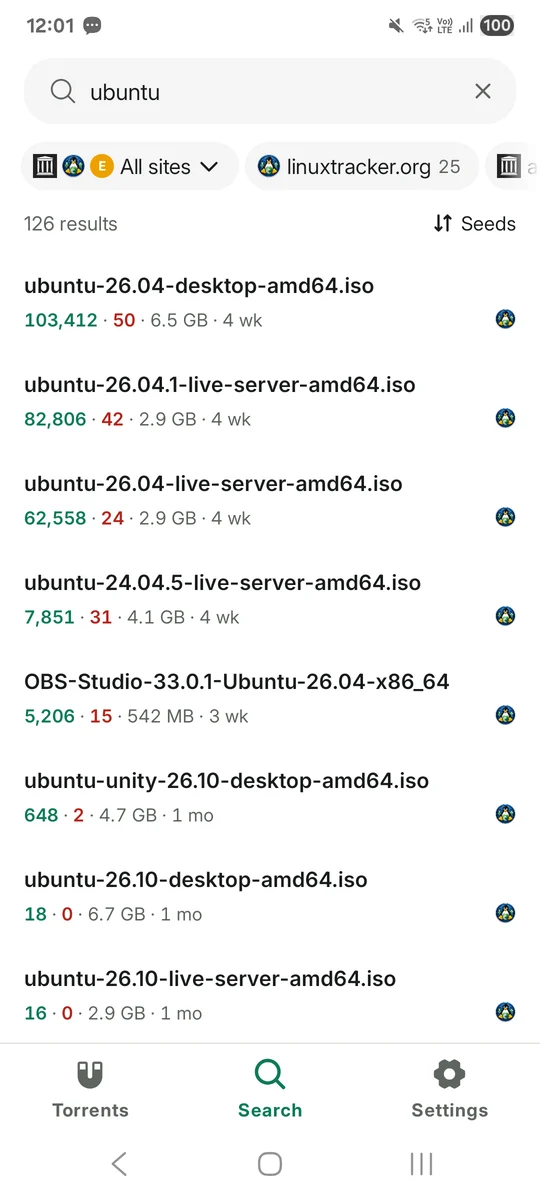
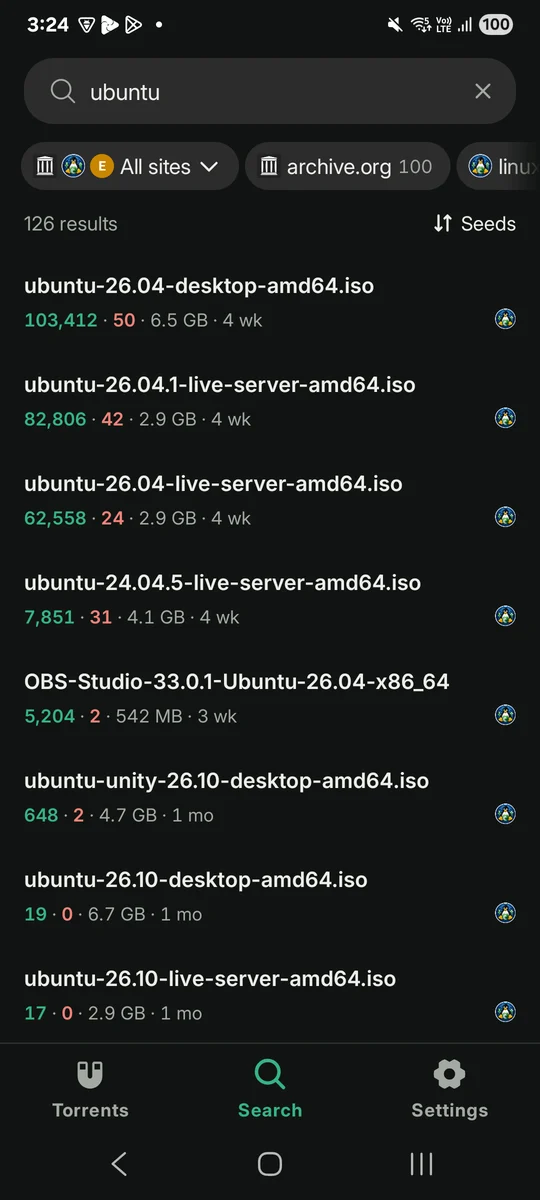
Magnet: playing a public-domain film at 10%, and one search across several sites.
Which one should you pick?
- Just want it to work: Flud.
- Open source: LibreTorrent.
- Search from inside the app: TorrDroid, or Magnet if you want to choose your own sites.
- Watch films while they download: Magnet, or µTorrent and BitTorrent with their players.
- Lots of settings to tune: tTorrent.
They all download the same torrents at about the same speed: speed depends on the people sharing a torrent, not on the app (see why torrents are slow). So pick the one whose design you like, and switch any time: your downloaded files stay in the Download folder.
Questions
Which torrent app is the fastest?
None, really. All of these use proven torrent engines. The number of seeds decides the speed.
Which one is safest?
All of these are on Google Play, which checks apps for malware. The bigger risk is the files you download: stick to sources you trust.
Is there an official qBittorrent or Transmission app for Android?
No. Apps with those names on Android are remote controls for the computer version, or unofficial.
Can I move my torrents from one app to another?
Your finished files stay in the folder and open in any app. Unfinished ones can be added again in the new app from the same magnet link or .torrent file, pointed at the same folder.